
For quick-service restaurant (QSR) owners, operators, and managers in the UK, staying ahead means embracing new ways to serve customers. Self-service kiosks are becoming a popular choice, changing how people order and how businesses run. But you might have a few questions about how they work and if they're right for your restaurant.
This guide will answer some of the most common frequently asked questions about restaurant self-service kiosks, helping you understand their benefits, costs, and how they can improve your business.
What is a Restaurant Self-Service Kiosk?
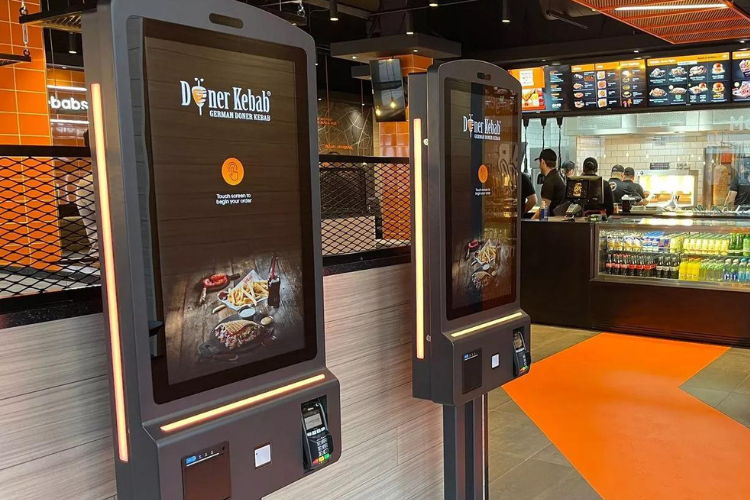
A restaurant self-service kiosk is a touchscreen device that allows your customers to place their orders and make payments on their own, without needing help from a cashier. These kiosks typically display your full menu on an interactive screen, allowing customers to easily browse, customise items, add extras, and complete their purchase using various contactless payment options. Think of them as a digital waiter that's always ready to take an order!
How Can Self-Service Kiosks Benefit My QSR?
Self-service kiosks offer a lot of advantages for quick service restaurants, helping both your customers and your bottom line. They can significantly reduce wait times by allowing multiple customers to order at once, which leads to a smoother restaurant workflow optimisation. This frees up your staff to focus on food preparation and customer service, improving overall restaurant efficiency tools.
Beyond efficiency, kiosks enhance the customer experience enhancement. Customers appreciate the control and convenience of ordering at their own pace, and they can easily customise their meals without feeling rushed. This also leads to increased order accuracy since customers are entering their own selections. Finally, kiosks are powerful tools for increasing sales through automated upselling prompts and can provide valuable data and insights into customer preferences.
What are the Different Types of Kiosks Available for Restaurants?
When you're looking for an ordering kiosk, you'll find a few main types. Freestanding kiosks are large, standalone units that are great for larger spaces in fast food restaurants. They offer a prominent self-service point. For smaller venues, countertop kiosks are a more compact option that sit on your counter. You can also use wall-mounted kiosks to save counter space, or a simpler tablet-based kiosk system which is a more affordable entry point into restaurant technology solutions. The best choice for your business will depend on your budget, available space, and desired customer flow.
What are the Essential Components of a Kiosk System?
A complete kiosk system is made up of a few key parts that work together. The hardware includes a responsive touchscreen display, a secure payment terminal for kiosk payment solutions, and a receipt printer. The software is the brains of the operation, which is a specialised kiosk software that displays your menu and handles the ordering process. This software is what allows you to offer customers a user friendly experience.
These components must seamlessly integrate with your existing POS system to ensure a smooth operation. This integration means that orders placed on the kiosk are sent directly to the kitchen, and sales data is updated in real time. This entire service solution is crucial for automated order processing and helps ensure every part of your business runs efficiently.
What are the Main Features of a Self-Service Kiosk?
Modern self-service kiosks are packed with features to make ordering easy and efficient. They have an intuitive, user friendly touchscreen that displays a dynamic digital menu you can update in real-time. This allows customers to browse items with clear images and descriptions. A key feature is the ability for customers to easily customise their orders and view allergy information before confirming.
The kiosks are also equipped with kiosk payment solutions that support a wide range of contactless payment options, making it quick and secure for customers to pay. They integrate directly with your POS system for automated order processing and can be programmed to upsell or cross-sell items to help increase your average order value. Some even have built-in customer feedback systems for gathering instant reviews.
How Do Self-Service Kiosks Integrate with Existing Restaurant Technology?
A crucial part of implementing a self-service kiosk is making sure it works well with your current restaurant technology solutions. The kiosk must connect seamlessly with your existing POS system, sending orders directly to the kitchen. This not only streamlines the order process but also ensures that your sales reporting and inventory management are always accurate and up-to-date in real time.
Many kiosks can also connect to your loyalty program, allowing customers to earn or redeem points during their purchase. This integration helps you gather valuable data on customer preferences, contributing to customer experience enhancement and allowing you to offer more personalised service.
What are the Costs Involved in Implementing Self-Service Kiosks?
The cost of a kiosk system varies widely depending on the type and features you choose. You can find simple tablet-based setups for a lower upfront cost, while more robust, all-in-one touchscreen kiosks with built-in card readers and receipt printers might cost £500 to over £2,000 per unit upfront.
Beyond the hardware, there are also ongoing costs to consider, such as monthly kiosk software fees, which can range from £35 to over £100 per kiosk.
You'll also have to budget for the initial installation and setup, which includes integrating the kiosks with your existing POS system. Finally, there are payment processing fees for every transaction, which are typically a small percentage of the sale. It's important to weigh these costs against the potential increase in sales and efficiency to determine your return on investment.
Will Self-Service Kiosks Replace My Staff?
This is a common concern for quick service restaurants, but the goal of a service solution like a self-service kiosk is not to replace your staff. Instead, it's designed to complement your team and allow them to focus on more valuable tasks. By automating the order-taking and payment process, kiosks free up your staff to provide better customer service, prepare food, and ensure the dining area is clean and well-maintained.
Using kiosks can actually empower your staff to have more meaningful interactions with customers, answering questions and providing recommendations instead of just taking orders. This leads to a better overall customer experience. In times of staffing shortages, kiosks can also help you maintain service levels and manage peak hours more effectively without putting extra pressure on your team.
How Can Kiosks Improve Order Accuracy?
Kiosks significantly improve order accuracy because the customer is the one who enters their own order. This greatly reduces the risk of mishearing or misinterpreting an order, which is a common source of mistakes. The system allows customers to review their order on the screen before confirming, giving them a chance to catch any errors themselves.
Additionally, a self-service kiosk allows customers to take their time selecting items and making customisations without the pressure of a queue. It also provides clear visual images of the menu items and can easily display detailed allergy and dietary information, helping customers to make informed and safe choices.
What About Customer Feedback Systems on Kiosks?
Many kiosk software solutions include built-in features for collecting customer feedback systems. This allows customers to provide instant feedback on their experience, either through a simple star rating after they pay or by answering a short survey. This provides you with valuable data and insights into what's working well and what areas may need improvement in your quick service restaurants.
By having a direct channel for feedback, you can quickly identify and address any problems, which is key for improving the customer experience enhancement. This real-time feedback loop is a powerful tool for making data-driven decisions about your menu, service, and operations.
Are There Any Downsides or Challenges to Consider?
While self-service kiosks offer many benefits, there are a few challenges to be aware of. The initial investment in kiosk hardware and kiosk software can be significant. There's also the possibility of technical issues, which is why it's crucial to choose a provider with reliable support.
Some customers may be slow to adopt the technology, preferring human interaction. It’s important to have staff available to help with a friendly customer service approach. You also need to consider the physical space required for installation and ensure the system is secure to protect both your business and customer payment data.
How Do I Maintain and Clean Self-Service Kiosks?
Maintaining your ordering kiosk is essential for both hygiene and smooth operation. The touchscreens should be cleaned regularly throughout the day with a suitable screen cleaner and a microfibre cloth to remove fingerprints and smudges. Given the high-touch nature of the device, frequent sanitisation is also crucial to ensure a safe experience for customers.
It's also important to conduct routine checks for any loose cables, paper in the printer, or general wear and tear. You should make sure your kiosk software is always up to date with the latest versions to benefit from new features and security patches. Training your staff on basic troubleshooting steps can help resolve common issues quickly.
What About Customer Data and Privacy with Kiosks?
In the UK, customer data and privacy are serious matters due to GDPR regulations. When using a kiosk system, you must ensure your chosen kiosk payment solutions are PCI DSS compliant, which means they meet industry standards for securely handling payment card data.
Most kiosk systems collect transactional data, but it is typically anonymised. If you integrate with loyalty programs, you must get clear consent from customers before collecting and using their personal information. It's important to choose a provider that can demonstrate how their system helps you remain compliant with data privacy regulations, so you can confidently offer customers a secure experience when they order and make payments.
How Can Kiosks Help with Staffing Shortages and Peak Hours?
A self-service kiosk is an excellent solution for managing staffing shortages and busy periods. During peak times, kiosks can handle a high volume of orders simultaneously, which prevents long queues and enables your kitchen to process more food. This is key for fast food restaurants where speed is a top priority.
By using kiosks, you can maintain a high level of service even with fewer employees. It takes the pressure off your staff during rush hour, allowing them to focus on order preparation and delivery. This flexibility and increased capacity contribute to your overall restaurant efficiency tools and ensure a consistent service solution for your customers.
How Can I Ensure a Smooth Implementation of Kiosks in My QSR?
For a smooth launch of a new kiosk system, careful planning is key. First, assess your restaurant’s layout and customer flow to determine the best placement and number of kiosks. Next, choose a reputable provider that offers a reliable hardware and a user friendly kiosk software that integrates seamlessly with your POS system.
It is also crucial to thoroughly train your staff on how to use the kiosks and how to assist customers. Using clear and welcoming signage will help guide customers to the kiosks and explain how to use them. After implementation, it's important to monitor usage and gather feedback from both customers and staff so you can make adjustments and continue to optimise your operations.
What Role Do Kiosks Play in Modern Restaurant Efficiency?
Self-service kiosks play a major role in modern restaurant efficiency. They provide automated order processing, which removes manual steps and reduces errors. By handling the repetitive task of taking orders, kiosks allow you to reallocate your staff to more valuable roles, optimising your labour force.
The data collected from the kiosks also provides valuable insights into what your customers want, helping you make informed decisions about your menu and promotions in real time. This data-driven approach, combined with faster service and increased accuracy, not only improves your operations but also enhances the overall customer experience. In short, kiosks are an essential tool for boosting profitability and staying competitive in the quick service restaurant industry.
For almost 20 years, 3S POS has offered one of the most flexible EPOS systems and Restaurant Payment Solution. Our clients include international brands such as Caffe Concerto, Chaiiwala, Heavenly Desserts, Pepe’s Piri Piri, GDK and thousands more delighted customers.
If you are looking for Self Service Kiosks for restaurants to boost revenue and efficiency, speak to our sales for a free demo.
.svg)